WinAsm Studio, The Assembly IDE - Free Downloads, Source Code
Forum

Pages: (2) [1] 2   ( Go to first unread post ) Reply to this topicStart new topicStart Poll

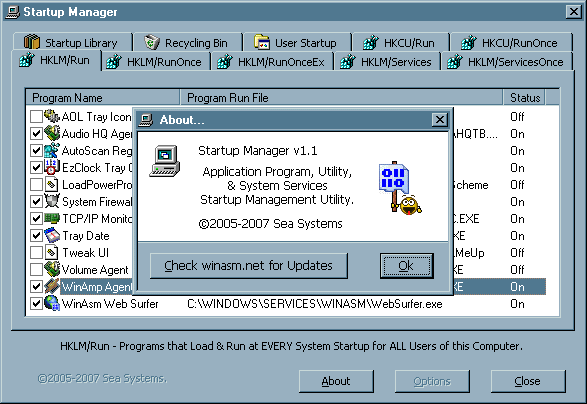
Windows Startup Manager, application program, utility & system services startup management utility [BETA].

SeaFarer
  Posted: Nov 28 2007, 09:09 AM
Quote Post


GO NAVY!
******

Group: Admins
Posts: 767
Member No.: 1464
Joined: 2-September 05


Screenshot...

Attached Image
Attached Image

PMUsers Website
Top
SeaFarer
Posted: Nov 28 2007, 09:25 AM
Quote Post


GO NAVY!
******

Group: Admins
Posts: 767
Member No.: 1464
Joined: 2-September 05


Greetings...

Here is Startup Manager.

It provides the ability to quickly configure Startup Items for
Windows 9x & Me Systems.

This WILL NOT run correctly on W2k,XP,NT, or Vista systems.

Features
--------------

1.) Right-click context menus.
2.) Drag & Drop new items.
3.) F1 thru F8 Function keys.


Notes
-----------

This is more or less a BETA release. The Options dialog is still under developement as is the Help system.

Also.. When Editing and Adding items, no syntax checking or file exists checking is peformed.

Some credit for Orignal Concept goes to Mike Lin.

XP/NT users might find his creation more useful than did I at this link...

Mike Lin's Home Page

Enjoy!

Sea ;)

-----------------------------------------------------------------
ZIP File Size: 37KB

Previous Downloads: 0

Last Update: 11-28-2007

MD5 Checksum: ba3657c09363327dd662e5d57108230c

Attached File ( Number of downloads: 16 )
Attached File  Startups.zip
PMUsers Website
Top
akyprian
Posted: Nov 30 2007, 12:00 AM
Quote Post


Administrator
******

Group: Admins
Posts: 1945
Member No.: 1
Joined: 12-May 04


It looks like a nice utility, but unfortunately I don't use Windows 98 like the vast majority of people around the world don't.

All screens of the utility are empty under Windows XP, You SHOULD consider making the right move to support Windows XP / NT.

Regards,

Antonis
PMEmail PosterUsers Website
Top
SeaFarer
Posted: Nov 30 2007, 04:40 AM
Quote Post


GO NAVY!
******

Group: Admins
Posts: 767
Member No.: 1464
Joined: 2-September 05


QUOTE (akyprian @ Nov 30 2007, 03:00 AM)
It looks like a nice utility...

Thanks Antonis.

Yes, this utility is very handy when reconfiguring how my 9x system starts.

Particularly the tray applets that are loaded, which is great when designing new projects that use the tray. It speeds up load time by only loading what is needed without the headache of manually editing the registry. Plus it makes reverting to normal configuration a snap. ;)

As for porting this over to XP...

Well... XP Pro is still $100.00 retail here and still outside my price range. We'll see what the future brings though. Not to mention XP's registry is structured differently. Basically a number of 9x keys were discontinued or changed. :(

Surely I'm not the only one representing the 12% of computer users that still run an Operating System that pre-dates XP? :unsure:

Near as I can tell, it works flawlessly so far. Some feedback from another 9x/Me user would be great! ;)
PMUsers Website
Top
SeaFarer
Posted: Nov 30 2007, 06:53 AM
Quote Post


GO NAVY!
******

Group: Admins
Posts: 767
Member No.: 1464
Joined: 2-September 05


As for further discussion...

A number of useful features are already in place for this Utility and WinAsm Studio project originally designed for use with Windows 98se. For instance...

In the case of configurable options:

1.) Mouse Hot Tracking.
2.) Warning dialogs.
3.) Confirmation dialogs.
4.) Use of Checkboxes.
5.) Case Sensitive Keyboard Input.
6.) Last Tabbed Window used.
7.) Permissions to Add/Change/Modify Items.
8.) Context-sensitive help.

Most of these have been defaulted to ON while designing the Options dialog.


In the case of features:

Mouse or Keyboard, Mouse Preferred!

1.) Right-click context menu inside the listview area of any tabbed window.

2.) Easily add exisiting items to the Startup Library, create new items, or move items around.

3.) Left-doubleclick the Item icon to view properties or edit .PIF, .LNK file properties.

4.) Execute, remove, or turn items ON or OFF.

5.) Standard Keyboard features, plus keys F1-F8.


Additional features could be...

1.) Multi-user???
2.) Administrator Password.
3.) Backup/Restore for Library entries.


My main goals of this project were to learn about...

1.) Tabbed Windows.
2.) Listview Controls with Icons, Checkboxes, and multiple items.
3.) Including/using String Tables.
4.) & wind up with something useful as a result.


Summary

Eventually I would like to post this complete with source.

Comments & suggestions welcome.
PMUsers Website
Top
1 User(s) are reading this topic (1 Guests and 0 Anonymous Users)
0 Members:

Topic Options Pages: (2) [1] 2  Reply to this topicStart new topicStart Poll